 ▶Watch on YouTube
- At launch, Highguard caps the frame rate at 60 FPS on anything running on battery power, like PC handhelds (and I'd assume laptops too). The 18 GB patch on day one didn't change that.
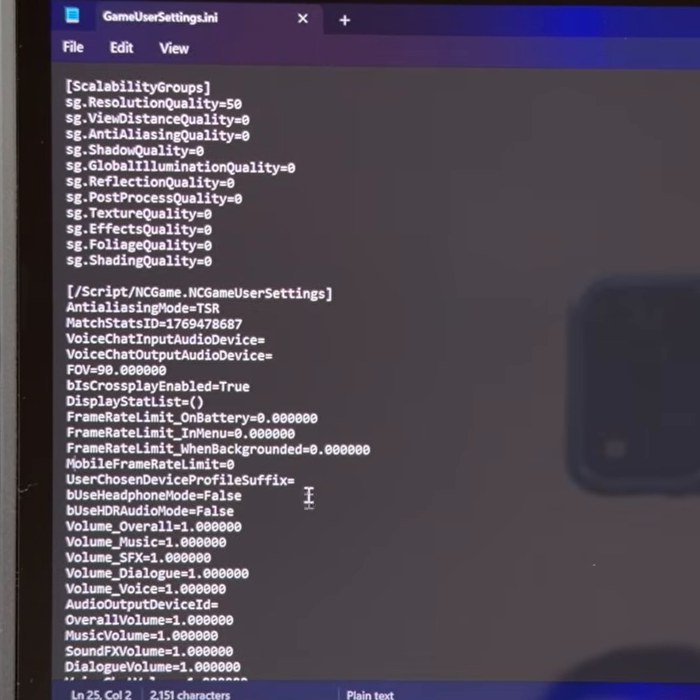
- The fix is one line in GameUserSettings.ini: set FrameRateLimit_OnBattery to 0.
- The file is in C:\Users\<your username>\AppData\Local\Highguard\Saved\Config\WindowsClient. AppData is a hidden folder.
- Same process on every device. I did it on the Legion Go 2 and the MSI Claw 8 AI+.
- On the Claw at 800p, I went from a flat 60 to about 68–70 FPS (overlay readings) in the firing range.
Highguard had been out for about 24 hours when I made this, and it came with a frame rate cap I didn't want. On a handheld running on battery, the game locks you to 60 FPS no matter what settings you pick, and the 18 GB patch that dropped on launch day didn't change that. Here's how to turn it off with a quick INI edit. I did it on the Legion Go 2 and the MSI Claw 8 AI+, and it's the same process on any Windows device.
What the cap looks like
On my MSI Claw 8 AI+, before the fix, I went into the firing range (no other players, which is a nice place to work on your settings) and dropped to 800p with 50% resolution scale. That should be good for somewhere around 70 to 90 FPS on this device, but the overlay sat right at 60 no matter what. The ROG Xbox Ally X was the same, stuck at 60 even though it can run the game a good bit higher, especially at 720p, or 800p on a 16:10 screen.
For upscaling, I believe the game uses TSR here. There's no FSR or other options in the game on these handhelds, and on my desktop there's only DLSS and TSR.
Before you start
- Close the game first.
- You'll need to see hidden folders, because AppData is hidden by default. In File Explorer, click the three dots at the top, go to Options, open the View tab, check the option to show hidden files and folders, then click Apply and OK.
How to remove the 60 FPS cap
- Open File Explorer and go to This PC → C: drive → Users.
- Open the folder with your username, not Default or Public.
- Go to AppData → Local → Highguard → Saved → Config → WindowsClient.
- Find GameUserSettings (the INI file) and open it in Notepad. You can double-click it, or right-click and choose to edit it in Notepad.
- About halfway down, under [/Script/NCGame.NCGameUserSettings], you'll see the frame rate limits. On my Claw they were FrameRateLimit_OnBattery=60, 30 for the background limit, 60 in the menu and 30 for MobileFrameRateLimit.
- Change FrameRateLimit_OnBattery to 0. That's the only one you really need to change to stop the cap when you're playing a match.
- Optional: I set all of them to 0 (FrameRateLimit_InMenu, FrameRateLimit_WhenBackgrounded and MobileFrameRateLimit) to get rid of most of the caps throughout the game. That's just the way I prefer it.
- Click File → Save, close Notepad and launch the game.
How it ran afterward
With the cap gone, the MSI Claw 8 AI+ at 800p went past 60 right away. Overlay readings in the firing range were around 68 to 70 FPS, with the APU at about 33W. On the Legion Go 2, I ran 1200p at 50% resolution scale to show some performance in a match with other players, and the overlay read around 70 FPS at about 24W. Your performance is going to vary depending on your device and what's going on in the match.
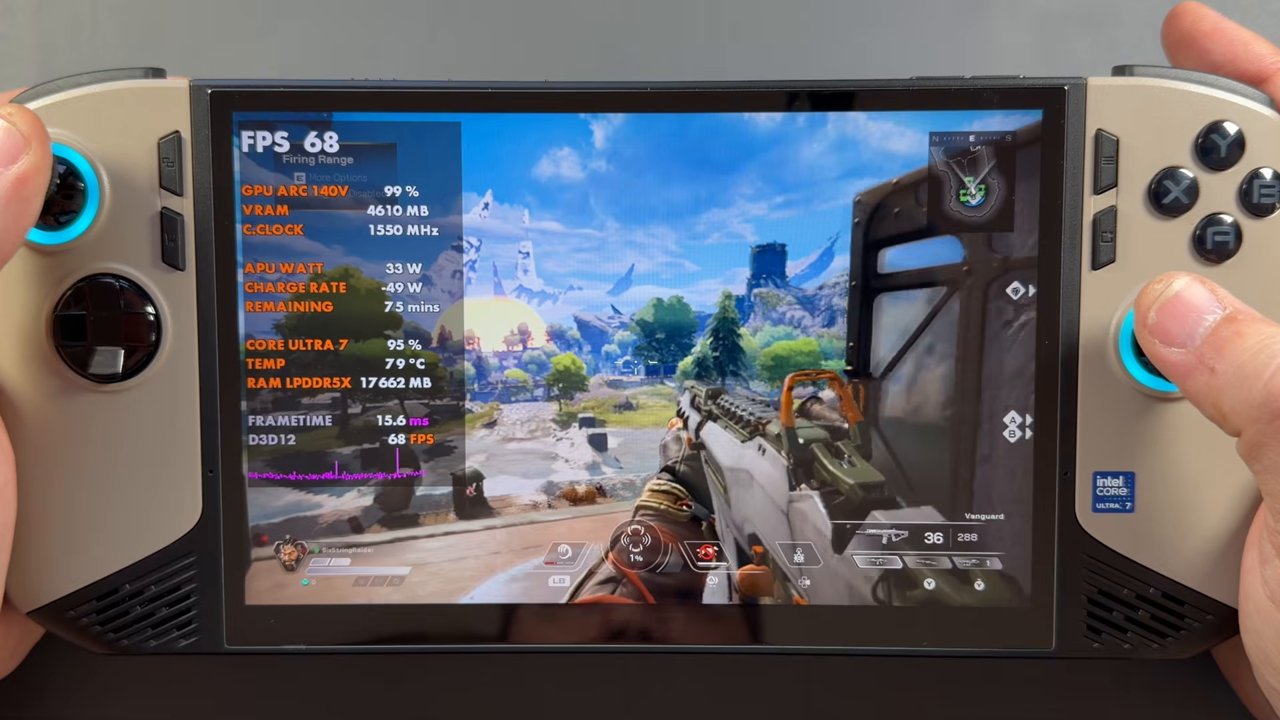
If you want more FPS, I do recommend going to 720p or 800p, adjusting the resolution scale and running pretty much all the settings on low, so the game runs as smooth as possible.
What to watch out for
- Edit the file in your own user folder, not Default or Public.
- This doesn't stop you from capping the game. You can still cap it to 30, 40, 60 or whatever you want in the in-game menu. Even a 60 FPS cap from the menu is fine, and I think it still performs a little better than those arbitrary caps in the INI file.
- Results will vary from device to device, and this is how things were at launch, so a later patch could change the file or the caps.
My take
For me, an uncapped variable frame rate is the way I prefer to play games like this, especially locally on a VRR display like the Legion Go 2's OLED. If you'd rather lock it, the in-game cap still works just fine. Who knows how Highguard is going to turn out after all the drama since The Game Awards, but if you want it uncapped on your handheld, this gets it done.
FAQ
Why is Highguard capped at 60 FPS on my handheld?
At launch, the game's GameUserSettings.ini has FrameRateLimit_OnBattery set to 60, so any battery-powered device is locked to 60 FPS. The 18 GB launch-day patch didn't remove it.
Where is Highguard's GameUserSettings.ini?
C:\Users\<your username>\AppData\Local\Highguard\Saved\Config\WindowsClient. AppData is hidden, so turn on hidden files and folders in File Explorer first.
Do I have to change every frame rate limit?
No. Setting FrameRateLimit_OnBattery to 0 is enough to remove the cap in matches. I set all of them to 0, but that's optional.
Does the fix work on every handheld?
It's the same file and the same process on any Windows device. I did it on the Legion Go 2 and the MSI Claw 8 AI+, and the ROG Xbox Ally X had the same 60 FPS cap before the fix.
Want more handheld tests?
New Steam Deck, ROG Ally, Legion Go and Steam Machine performance videos every week.