Quick answer: Decky Xbox Dashboard is a new Decky Loader plugin that replaces the Steam Deck's Game Mode home screen with an Xbox Series X|S-style dashboard, with LB/RB tabs, Xbox-style game pages and Xbox colors. It's an alpha and installs from a ZIP file.

A new Decky Loader plugin called Decky Xbox Dashboard swaps the Steam Deck's Game Mode home screen for one modeled on the Xbox Series X|S dashboard. Windows Central covered it on October 30. The plugin comes from a developer known as kromossomom and is open source under the MIT license.
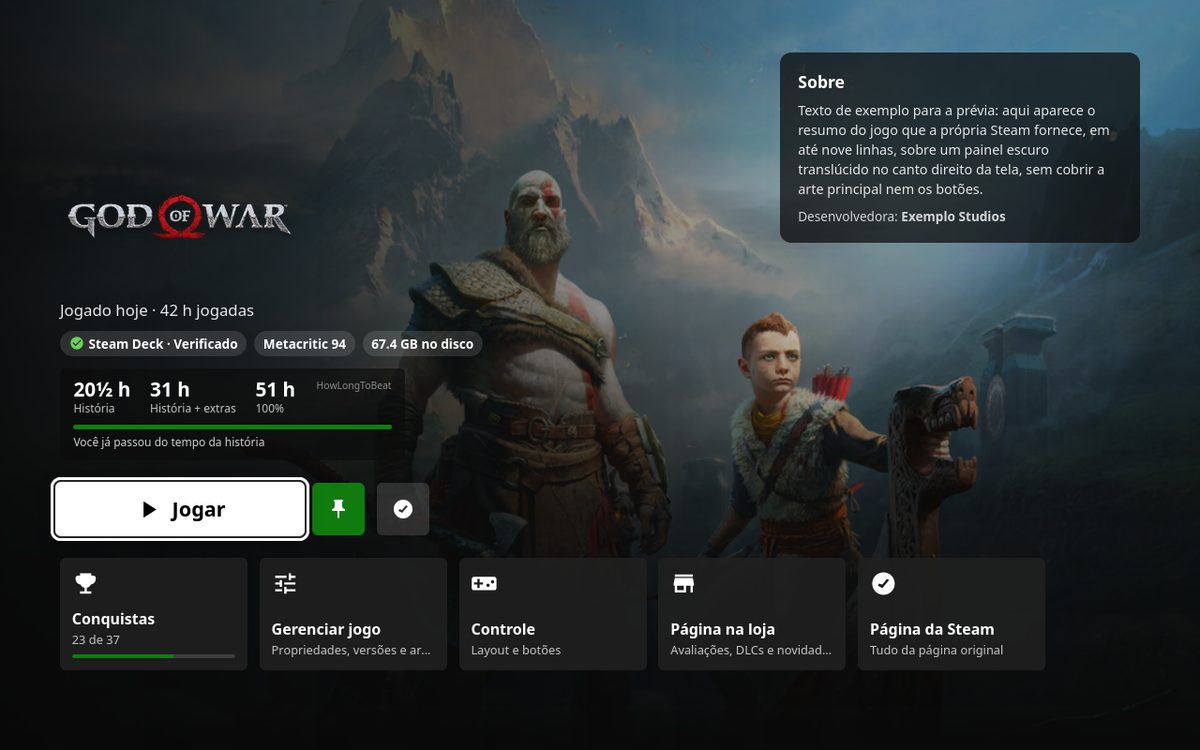
The home screen fills the background with the selected game's art and puts tabs across the top: Home, My games & apps, Store, Community and System. LB and RB switch between them, and B goes back to Home. Pressing Y on any game opens an Xbox-style game page with a big Play button, Steam Deck compatibility, HowLongToBeat times, achievement progress and shortcuts. X pins a game to a Pinned row on Home.
The plugin also recolors Steam's menus with Xbox greens and greys and gives the Steam menu, Quick Access and power menu a Guide-style look. Its GitHub page says turning off "Xbox colors everywhere" or "Xbox home screen" puts Steam back to normal right away, with no restart. Everything shown comes from your Steam library. The only outside request is the HowLongToBeat lookup, and you can switch that off.
This is a new look for Steam's own Game Mode, not a way to play Xbox or Game Pass games. If that's what you're after, Xodus Nexus is a separate project for that.
It's still early. The latest release is v0.0.9-alpha, and Windows Central notes the developer used Claude AI to help build it. Installing is manual: download the ZIP from the GitHub page, turn on Developer mode in Decky's General settings, then use Install Plugin from ZIP. Decky Loader has to be installed first.
Tested on the channel: How to Make SteamOS Better on the Legion Go 2 with Decky Loader (video) · full article