 ▶Watch on YouTube
Auto SR, Microsoft's Auto Super Resolution, recently arrived on the ROG Xbox Ally X as a preview for Xbox Insiders. I showed how to turn it on in my video on the latest BIOS and GPU driver updates, but this one goes deeper into what it's really for, how it works, and how it compares to FSR when you're docked, with a focus on 4K output from a 720p game resolution.
- Auto SR is an OS-level upscaler that runs on the NPU (about 1 to 2 watts) instead of the GPU. It takes a 720p or 900p game resolution up to your display's output.
- It's a preview for Xbox Insiders, and it's really meant for docking. After an update, it only kicks on with an external display connected.
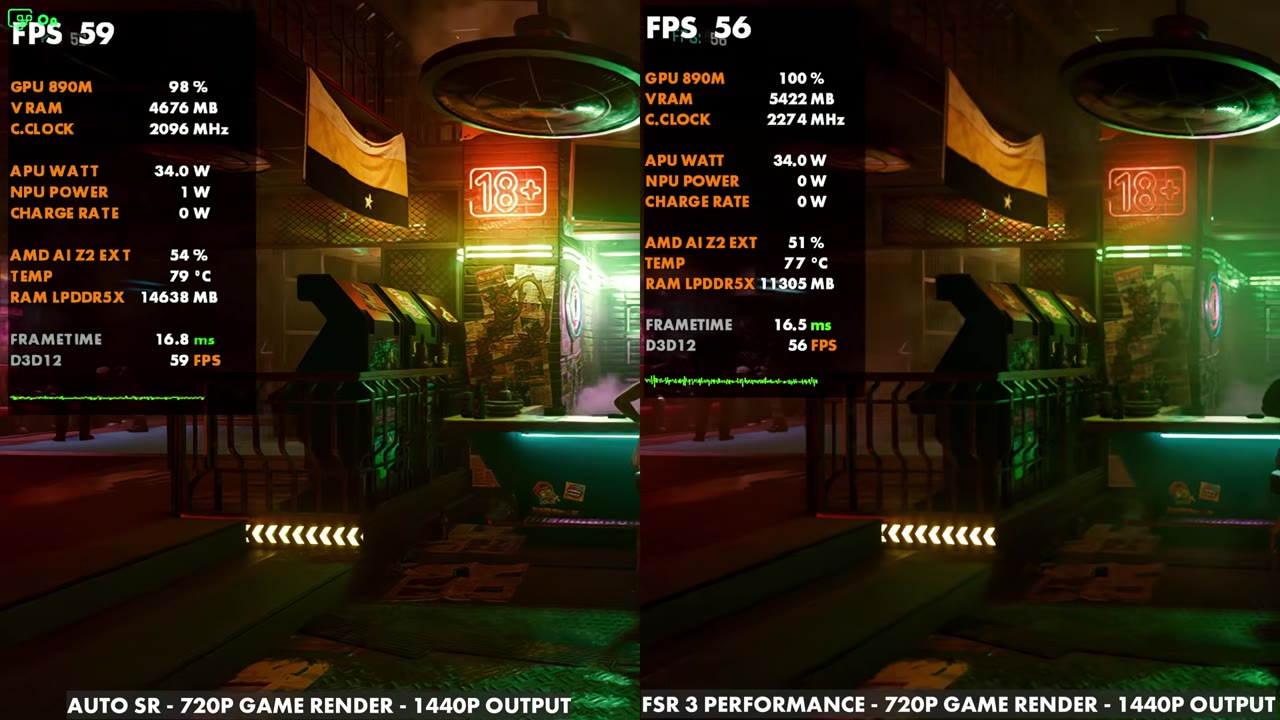
- At 1440p output, Auto SR and FSR 3 rendering the same 720p ran pretty similar on the overlay in Cyberpunk 2077.
- At 4K output, Auto SR pulls ahead: in Crimson Desert the overlay read about 39–45 FPS with Auto SR against 29–33 with FSR 3 Ultra Performance, and in RoboCop: Rogue City about 44–61 against 28–34, with less VRAM used.
- Image quality is very comparable. In my opinion FSR 3 can look a little better standing still, but Auto SR has looked better to me in motion.
What Auto SR is and where it works
Microsoft's focus with this round of updates for the Xbox Ally X is the docking experience, not so much handheld. Along with Auto SR, docked play now defaults to your TV, so it turns off the Xbox Ally X's own screen for you, and there's automatic gaming enhancements on smart TVs, much like a console. Auto SR is the Auto Super Resolution preview for Xbox Insiders, and Microsoft has a how-to page covering what makes it work and how to set it up. You do need to be an Xbox Insider, and it's for 720p to 900p gaming. I mostly stuck to 720p for the in-game settings here.
On day one, in my last video, I could use Auto SR while plugged in and not docked, upscaling Crimson Desert from 720p or 900p to the handheld's native 1080p, and it was working fine. After an update, that no longer works. Microsoft did say it would only launch with docked and external display support, so I was surprised it worked that way at first. At least in my testing, you now have to be connected to an external display for it to kick on.
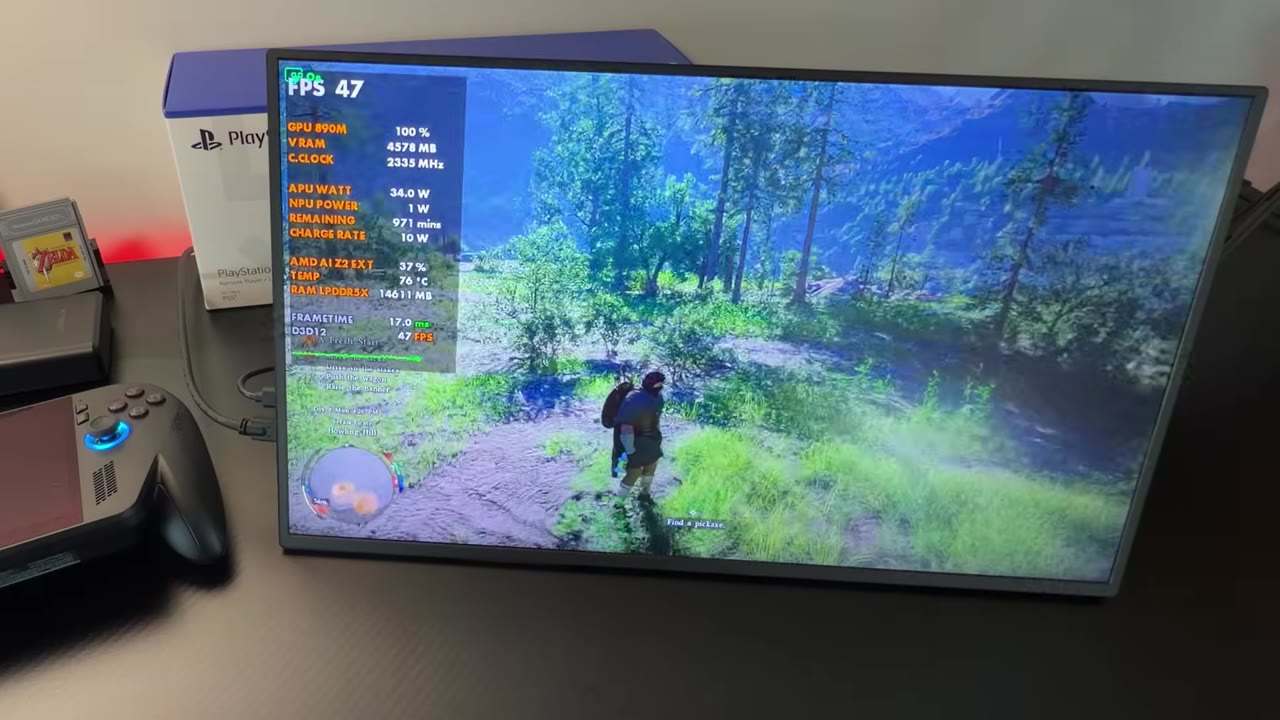
For this testing I used my 19-inch 4K 16:9 UPerfect monitor, which works well for messing around with 4K output, and I've tried it on my 65-inch TV as well.
How it works with and without FSR
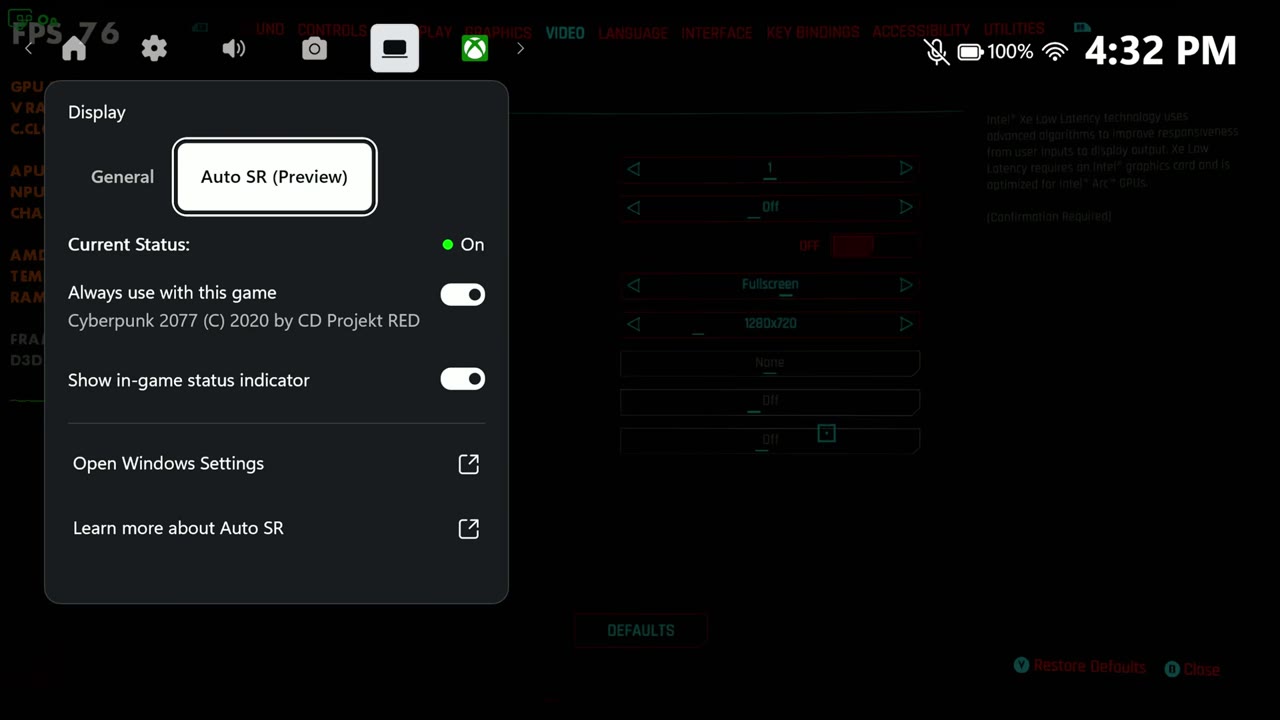
What makes Auto SR work is the in-game resolution: 720p (or 900p) with no FSR. When it's on, you get an Auto SR badge at the top left, and the Game Bar shows it's enabled for that game with the 4K display output. In Crimson Desert I used a high, medium and low custom mix that's been working well on the Xbox Ally X, but the settings matter less here than what Auto SR is doing.
- 900p vs 720p: at 900p you lose some frames, because the GPU is now rendering 900p instead of 720p. The NPU, typically using about 1 to 2 watts, does all of the upscaling work to 4K either way.
- Stacking FSR and Auto SR: you can. Set FSR to Quality with the game at 720p, and FSR renders below 720p and upscales to 720p, then Auto SR takes that to 4K. You get more frames because there's less work on the GPU, but the image isn't as good since you're upscaling the 720p first. Auto SR isn't really a replacement for FSR.
- Auto SR off: frames go up a bit, because the NPU isn't drawing any power and the GPU or CPU clocks can come up. But you're only outputting 720p or 900p, and on a bigger screen that doesn't look as good, with or without FSR.
- FSR doing the 4K upscale instead: set the game to 4K with FSR Ultra Performance, and it also renders at 720p, but FSR uses the GPU to upscale to 4K. That uses a lot more VRAM and loses a lot more frame rate, usually about 10 FPS less in Crimson Desert than Auto SR from the same 720p. With the game set to 4K, Auto SR won't turn on, since it only wants the lower game resolution.
Switching back to a plain 720p game resolution with just Auto SR, the badge kicks back on, and in that spot I was about 10 to 13 frames higher than with FSR doing the 4K upscale, still with a 4K output. That's where Auto SR really gains, and that's without stacking the two.
Auto SR vs FSR 3, side by side
For the comparisons, both sides render the game at the same internal resolution where the game allows it, and then upscale in different ways to the same output. All FPS numbers below are on-screen overlay readings from the side-by-side footage, checked every two seconds. Settings were the same on both sides of each comparison.
Cyberpunk 2077 at 1440p
With roughly medium settings, Auto SR took a 720p game resolution to 1440p, against FSR 3 Performance with the game set to 1440p, which also renders at 720p. In the bar, the overlay read about 56–62 FPS with Auto SR and 51–70 with FSR 3. Standing still out in the street later, it was about 58–59 with Auto SR against 51–57 with FSR 3.
So at 1440p they end up pretty similar. Auto SR can come out a little ahead depending on what's on screen, with less VRAM used and a bit lower GPU clocks, since the TDP is spread out more with the NPU cores working. It takes the upscaling load off the GPU and CPU, which is pretty clearly what Microsoft is going for at the OS level.
Cyberpunk 2077: Auto SR at 4K vs 1440p
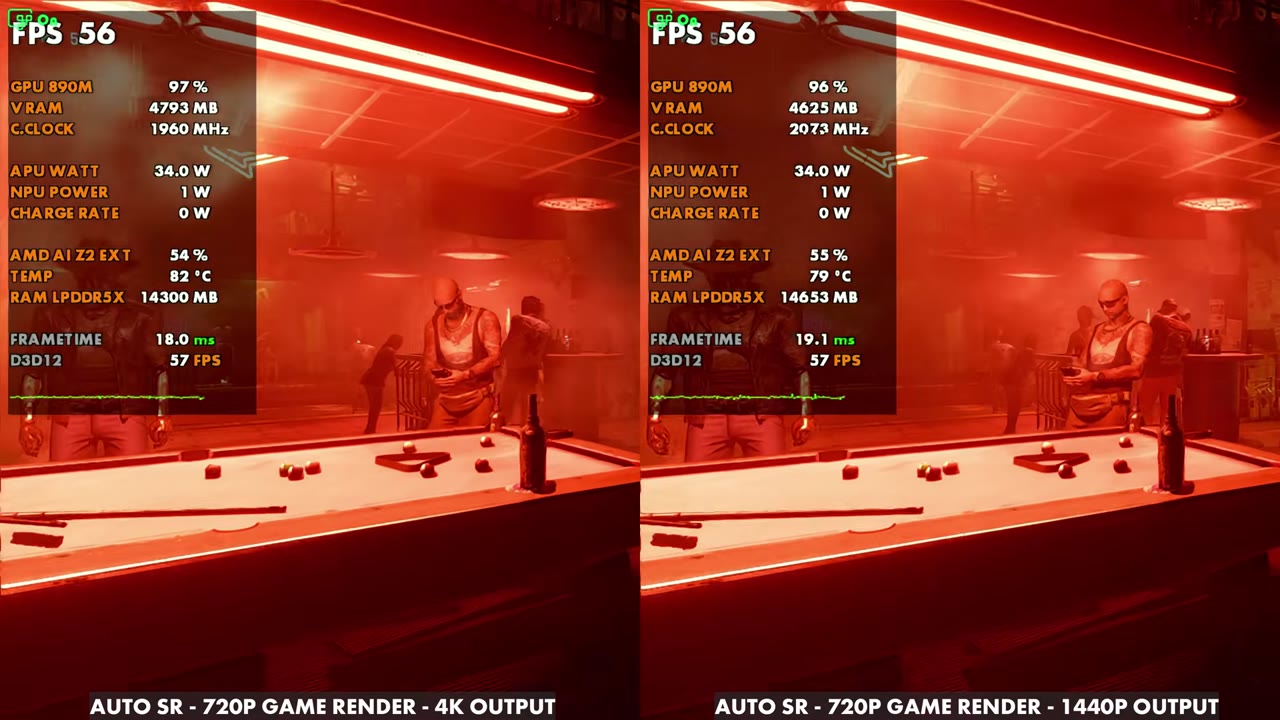
Taking Auto SR from 1440p up to 4K made basically no difference other than the output resolution. Side by side, both read about 53–60 FPS. There's a little VRAM difference, and the 4K side usually has slightly lower clocks because the NPU is working a little harder, but you're not touching GPU or CPU performance by going to 4K like you would with FSR.
Cyberpunk 2077 at 4K
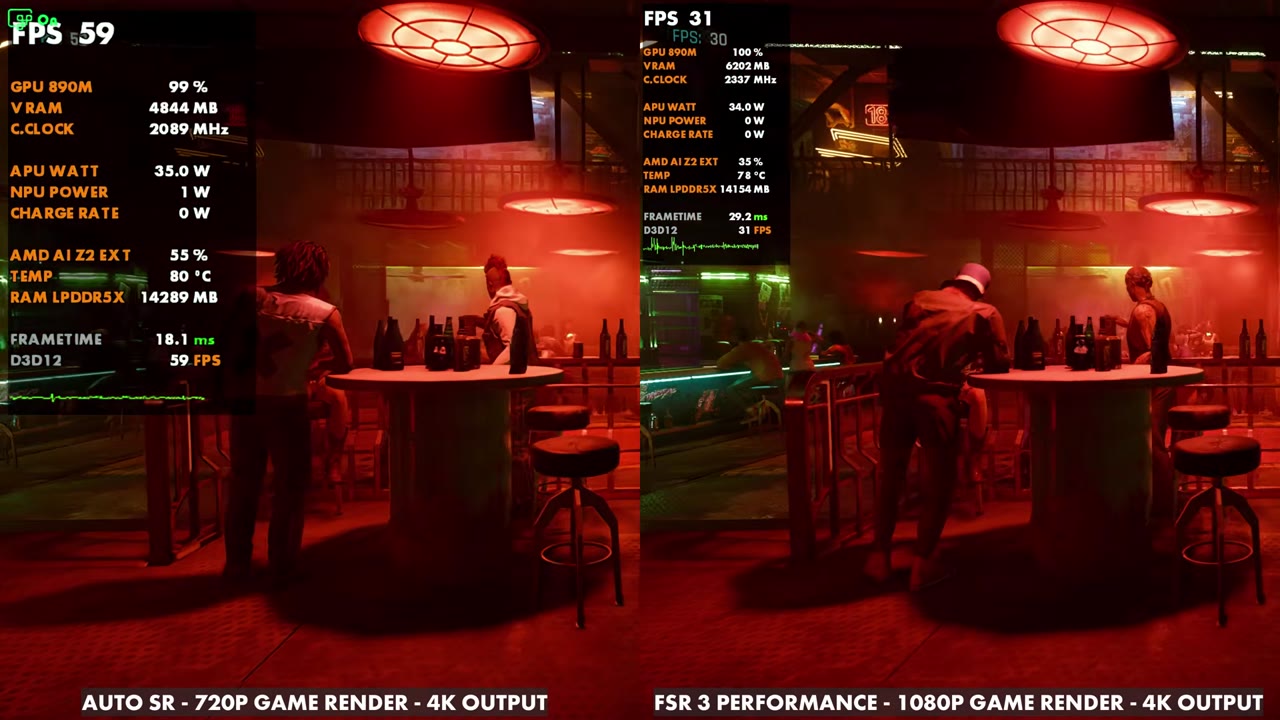
This one isn't a direct comparison. Cyberpunk only has Performance mode here, not Ultra Performance, so FSR 3 at 4K renders at 1080p. Auto SR from 720p read about 55–60 FPS, against 29–33 for FSR 3 Performance. Even with Ultra Performance, I'd guess FSR would be around 40 FPS, and Auto SR would still win out a lot at 4K output, with a great picture.
Crimson Desert at 4K
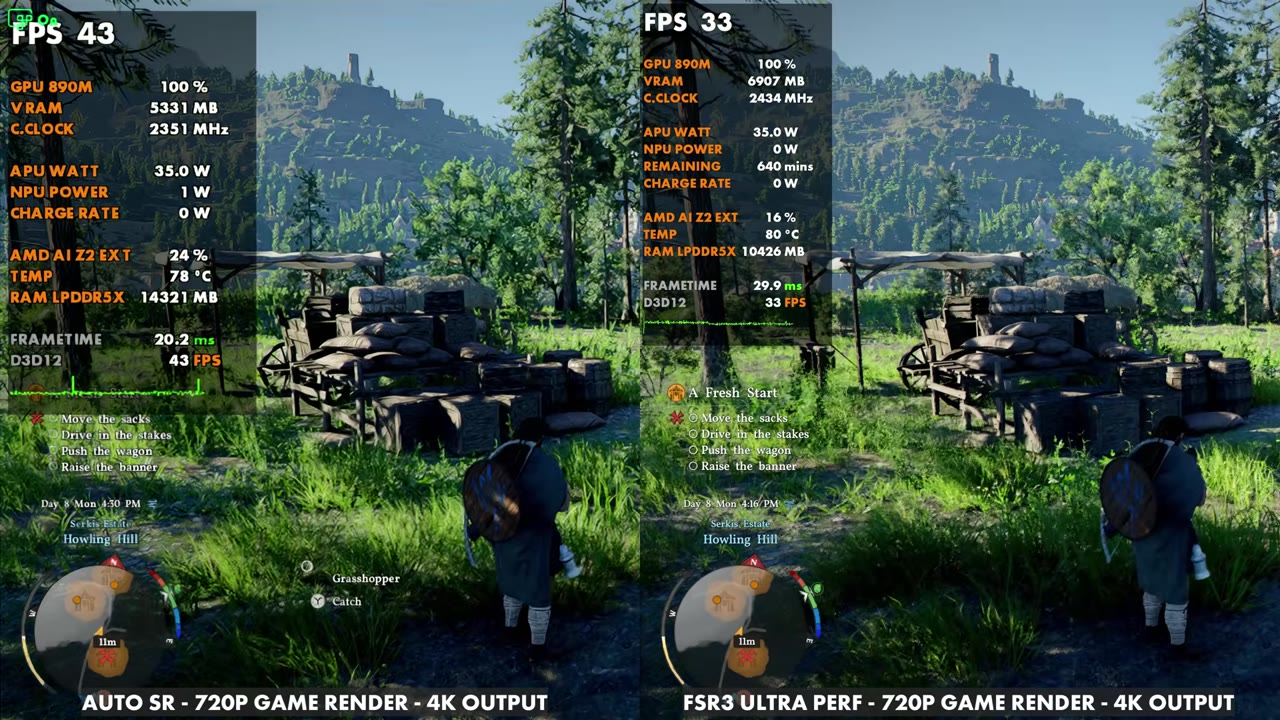
Both sides render at 720p here, Auto SR from a 720p game resolution and FSR 3 Ultra Performance with the game at 4K. The overlay read about 39–45 FPS with Auto SR and 29–33 with FSR 3, with a lot less VRAM used on the Auto SR side (about 5.3GB against 6.9GB in the shot below) and very similar image quality. GPU clocks were probably a little lower on Auto SR, again because the TDP is spread out.
RoboCop: Rogue City at 4K
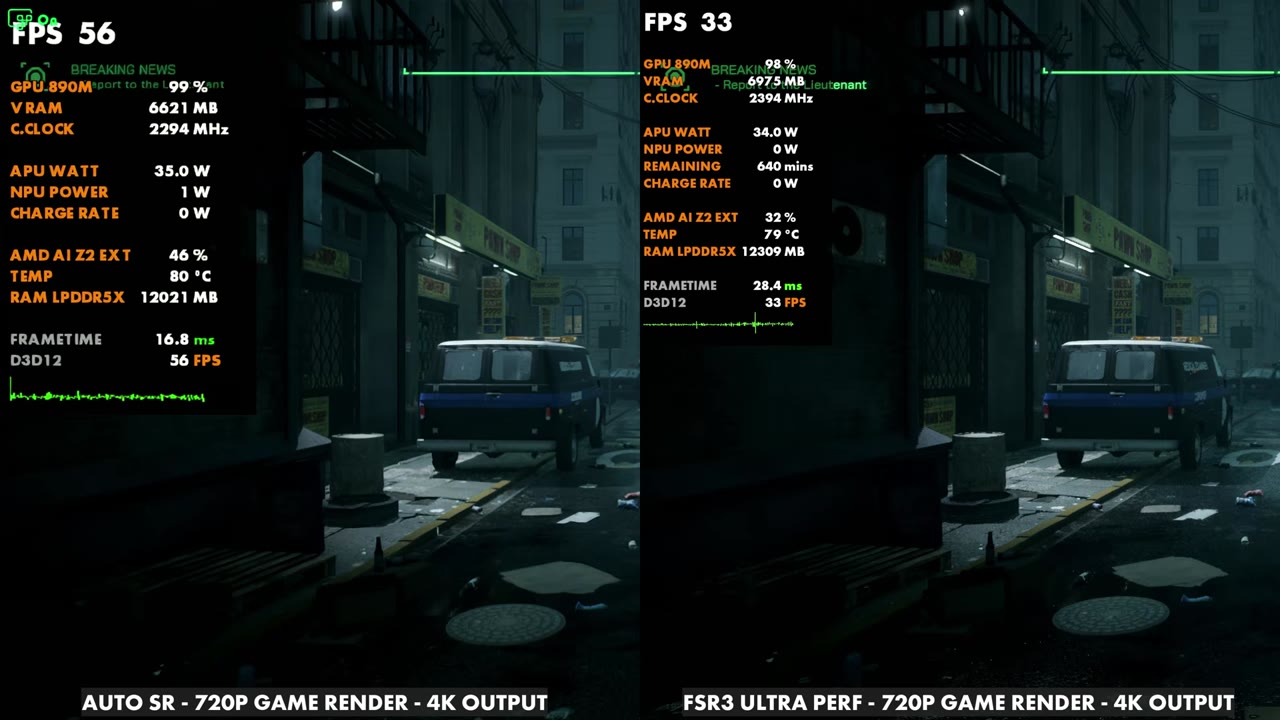
RoboCop needs low settings to run on these systems, but these days it runs pretty well. Auto SR took a 720p game resolution to 4K, against FSR 3 Ultra Performance with the game at 4K, which also renders at 720p internally. Auto SR stayed in the 40s and 50s, about 44–61 FPS on the overlay, with the NPU using a little power. FSR 3, with the exact same settings and output, read about 28–34, since it has to use so much more of the GPU to upscale all the way to 4K on a device like this.
This is where the motion difference really shows. Auto SR is a lot cleaner in motion than FSR 3 Ultra Performance trying to pull off the same upscale. Standing still, depending on the game and implementation, the lighting can look a little better with FSR.
Final thoughts
Auto SR and FSR are different technologies, just like XeSS or DLSS, so this isn't apples to apples. Auto SR works at the OS level and uses the NPU cores to take the heavier load off the GPU, CPU and VRAM, and it's very specifically made for docking, especially at 4K. That's where it really shines. At 1440p the two end up pretty similar.
This is only a preview and just the beginning, and I think there's a lot of potential here for the docked performance of these handhelds. I hope Microsoft adds more, like a 1080p game resolution upscaled to 4K, and it would be nice to see it get better in certain games. I also think Microsoft is using the Xbox Ally X a bit as a guinea pig for its upcoming Project Helix console, which will basically be a PC and console hybrid and will probably lean on technologies like this. I have a lot more testing to do, and I'll keep an eye on it as it evolves.
FAQ
Does Auto SR work in handheld mode on the Xbox Ally X?
Not anymore in my testing. It worked plugged in on day one, but after an update it only kicks on with an external display connected.
What game resolution does Auto SR need?
720p or 900p in the game. With the game set to 4K, even with FSR Ultra Performance rendering at 720p, Auto SR won't turn on.
Can you use FSR and Auto SR together?
Yes. FSR can upscale from below 720p to 720p, and then Auto SR takes it to your output. You get more frames, but the image isn't as good.
Want more handheld tests?
New Steam Deck, ROG Ally, Legion Go and Steam Machine performance videos every week.