 ▶Watch on YouTube
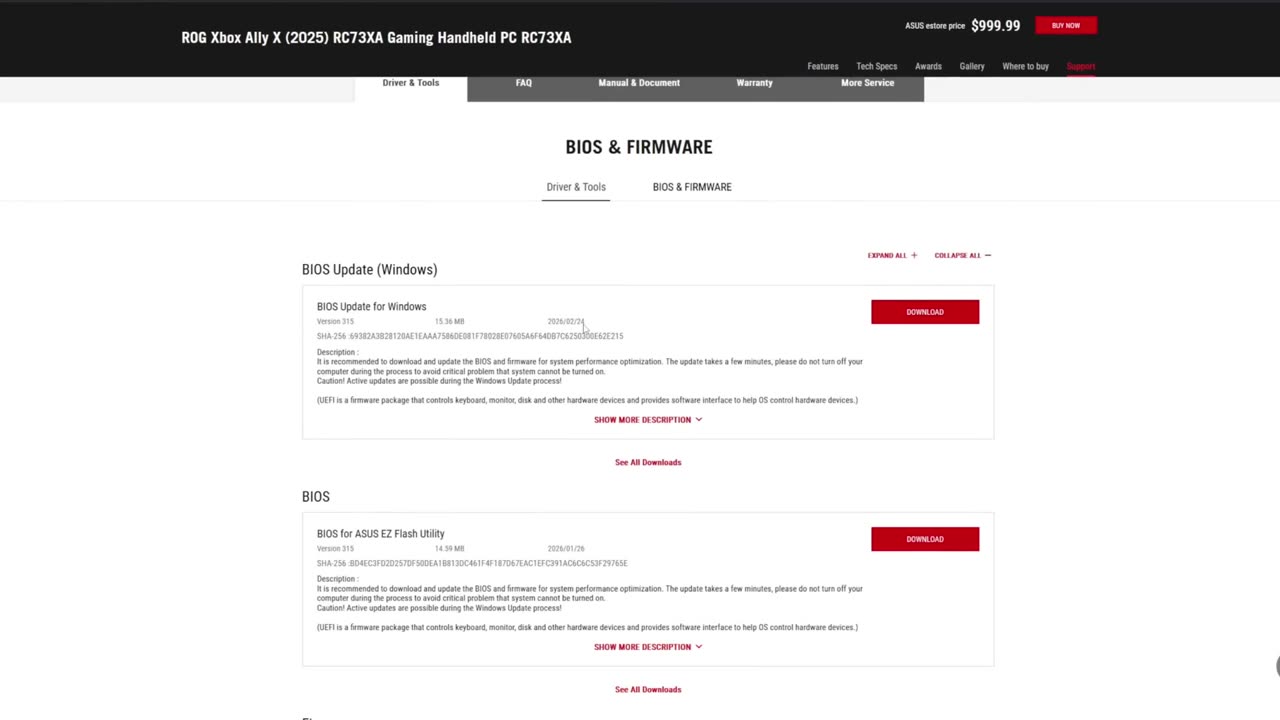
- ASUS released BIOS 315 for the ROG Xbox Ally X, listed on the support site on February 24, 2026. It came the same day as Microsoft's February 25 Xbox update for the Ally devices.
- You can install it from Armoury Crate, MyASUS (System Update) or Windows Update. For me, it kicked in automatically after a Windows Update restart.
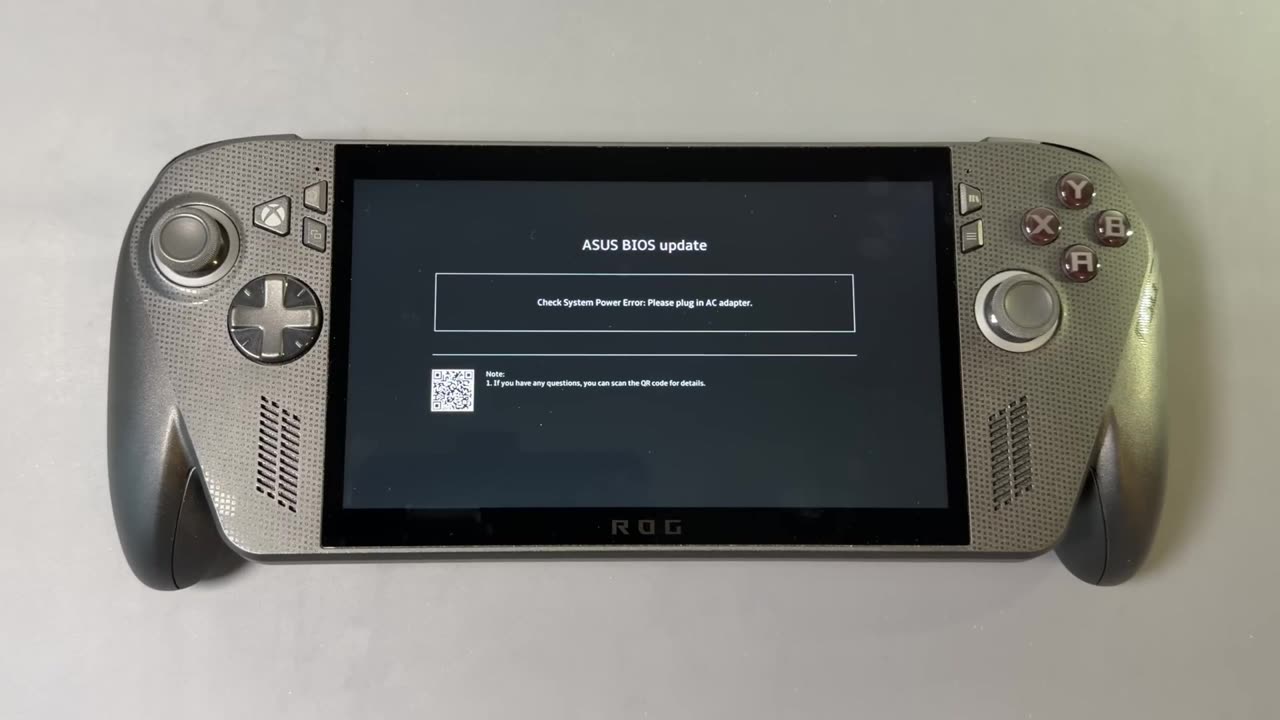
- Stay plugged in. If you're not, the BIOS update just waits for the AC adapter.
- The whole thing took about 10 minutes, with restarts, black screens and flashing lights along the way.
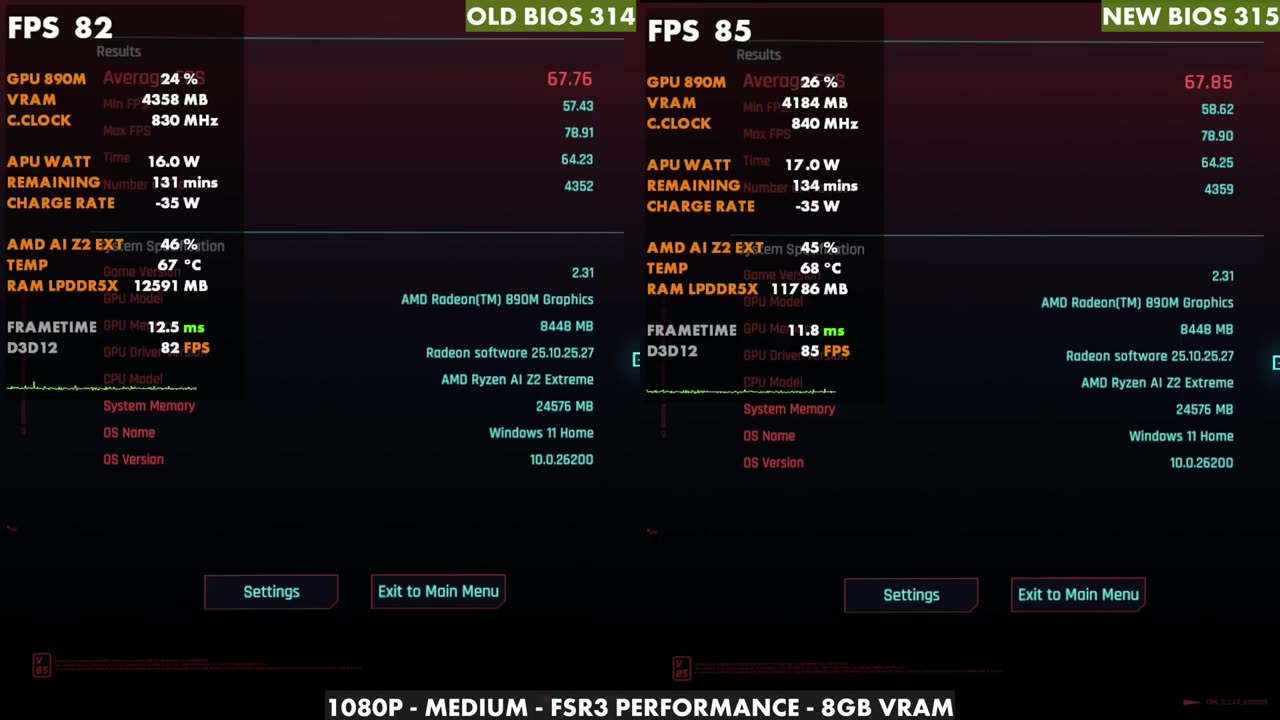
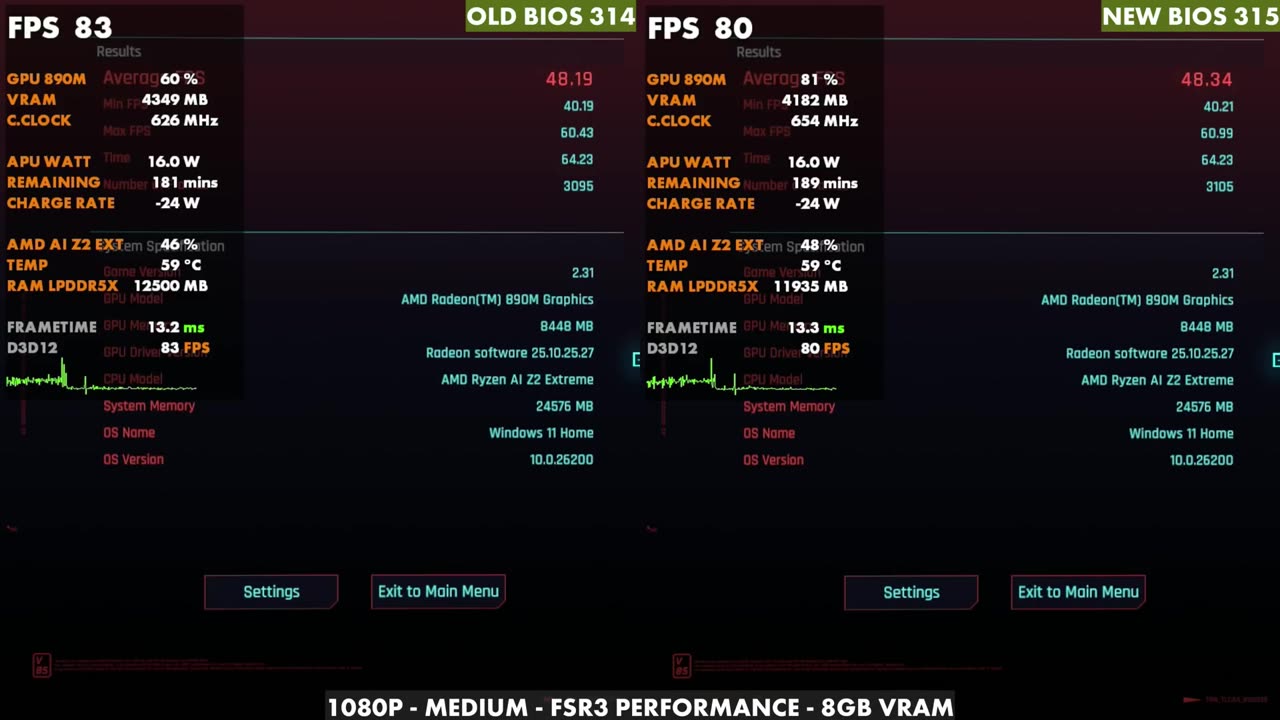
- Cyberpunk 2077 benchmark: 67.85 FPS on 315 vs 67.76 on 314 at 25W, and 48.34 vs 48.19 at 17W. Basically the same, maybe a slight edge to 315.
- Still no new GPU driver at the time. That's what I'm really waiting for.
Microsoft released more updates for the ROG Xbox Ally X on February 25, 2026, and ASUS had a new BIOS ready to go with them. Here's what came with the February update, how BIOS 315 installed on my Xbox Ally X, and a quick Cyberpunk 2077 comparison against BIOS 314 like I usually do.
ASUS has released newer BIOS versions since then. For the next one, see my BIOS 316 guide, and for later updates, BIOS 317 and BIOS 319.
What came with the February 2026 update
Xbox Wire's February Xbox Update post has a section just for the ROG Xbox Ally devices:
- Improved removable storage formatting: in the Xbox full screen experience, you can format microSD cards for your games right from the Xbox app.
- Advanced Shader Delivery indicator: supported games show a notice on the loading screen when shaders were preloaded, which should help games launch faster and run better. That's something I'll look at in the future.
- Additional improvements in the patch notes. Nothing major, but there are Game Bar audio widget improvements, better library filtering, default game profiles that now use Balanced in Windows instead of Performance, and better UI at 900p.
On the ASUS support site, there were still no new graphics drivers. BIOS 315 for Windows was there, dated 2026/02/24.
Before you start
- Switch to the Windows desktop. It's a little easier to do everything there, and BIOS updates usually come with Microsoft Store updates and Windows updates too.
- Get your Microsoft Store and Windows updates done while you're there. Game Bar and Windows services updates were popping up for me.
- Plug in. The BIOS update won't run on battery. It just sits and waits for you to plug in, so it doesn't stop halfway through.
How to install BIOS 315
There are multiple places to install it. Pick one:
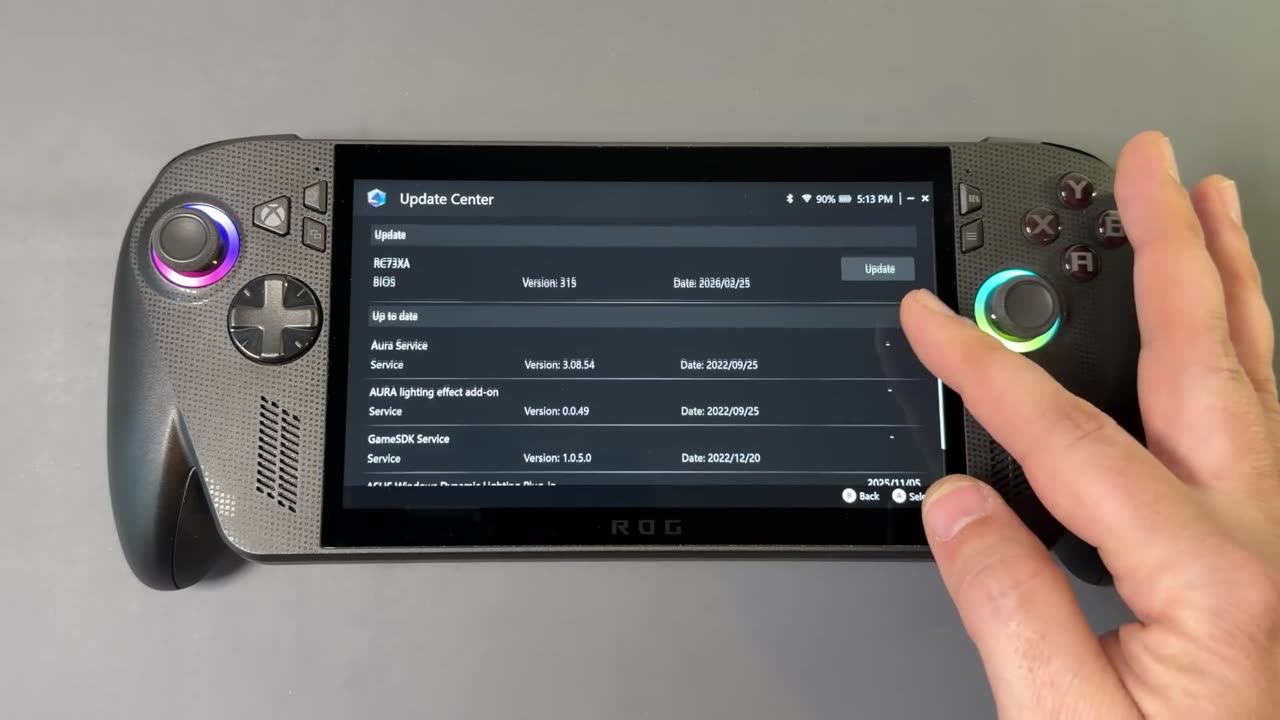
- Armoury Crate: open Armoury Crate, go to Update Center and check for updates. BIOS 315 was already showing for me. Tap Update.
- MyASUS: go to System Update, where it shows up as well.
- Windows Update: it picks up the BIOS there too. When I downloaded the current Windows updates and restarted, the BIOS update kicked off automatically. I didn't get to use MyASUS or Armoury Crate at all.
Once it starts:
- Make sure you're plugged in. If you're not, the ASUS BIOS update screen shows a power error asking you to plug in the AC adapter, and it waits.
- Let it run. It takes quite a few minutes, about 5 to 8, and you'll see restarts, black screens and flashing lights.
- It finalizes, prepares everything and restarts again. Then you're back in Windows.
- Check Armoury Crate → Update Center to confirm BIOS 315 is installed, then boot back into the Xbox full screen experience if that's what you use.
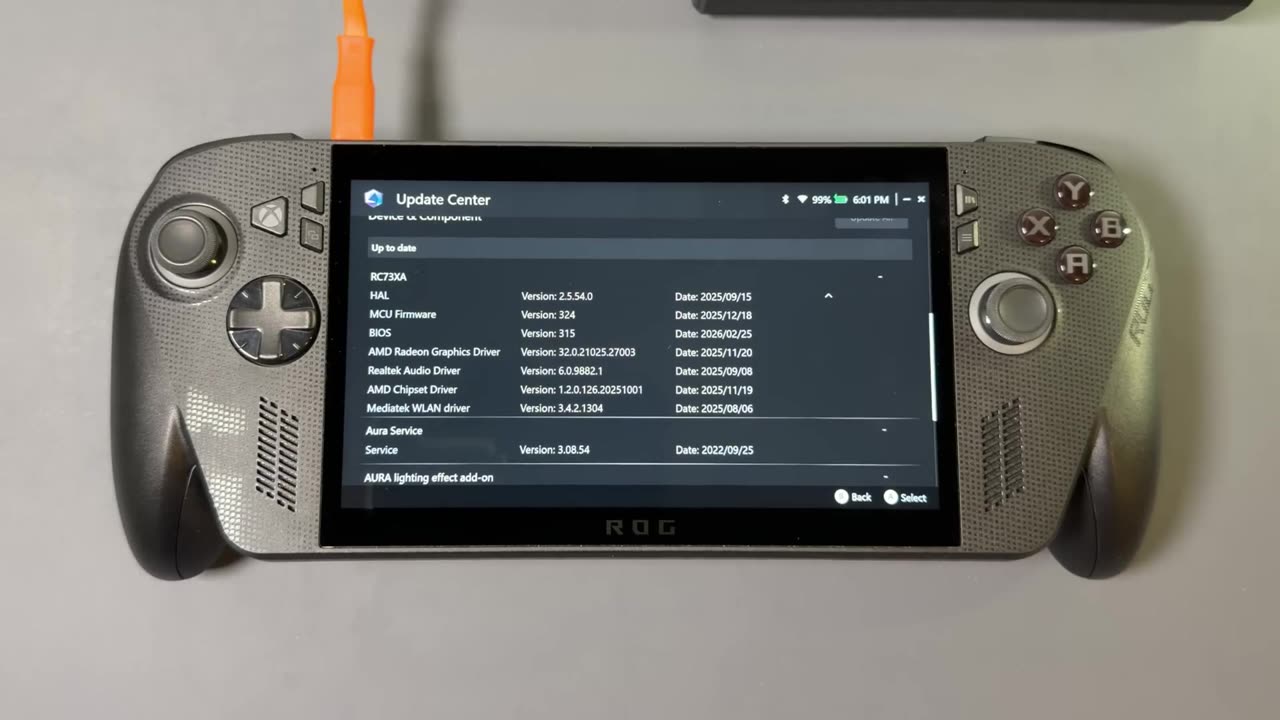
All in, it was pretty quick and easy, about 10 minutes. I haven't had any trouble yet with the ASUS BIOS updates on these devices.
How Cyberpunk 2077 ran: BIOS 314 vs 315
I ran the Cyberpunk benchmark at 25W and 17W on both BIOS versions, just to make sure everything's working the way it should. Settings were 1080p, the Medium preset, FSR 3 Performance and 8GB VRAM. The results screens show Cyberpunk 2.31 on Radeon Software 25.10.25.27, Windows 11 Home.
| TDP | BIOS 314 avg (min / max) | BIOS 315 avg (min / max) |
|---|---|---|
| 25W | 67.76 FPS (57.43 / 78.91) | 67.85 FPS (58.62 / 78.90) |
| 17W | 48.19 FPS (40.19 / 60.43) | 48.34 FPS (40.21 / 60.99) |
Numbers are from the in-game benchmark results screens in the video. At 25W, the run looked very similar, with maybe a slight advantage for 315 in the frame rate side by side. It almost looked like it was taking a little off the GPU and giving it back to the CPU, which could help FPS in this game. When the benchmark finished, they were basically the same, and that's better than being broken. I didn't expect any big differences.
I tested 17W as well, since I did that on BIOS 313 and 314 with Cyberpunk too. It runs the same here, again maybe with a slight advantage for the newer BIOS. I think ASUS had already done so much to improve things at 17W that there isn't a big difference left.
My take
BIOS 315 does seem to run just that slight bit better than 314 and 313, and nothing has been getting broken with these updates, at least for me. What I really want is a new GPU driver to go along with the BIOS updates. When that lands, I'll test multiple games side by side, since I have footage from the launch of this device all the way up to now to compare against.
FAQ
How do I install BIOS 315 on the ROG Xbox Ally X?
Through Armoury Crate (Update Center), MyASUS (System Update) or Windows Update. For me it started automatically after restarting from Windows Update. Stay plugged in the whole time.
Does BIOS 315 improve performance?
Barely. In Cyberpunk 2077 at 1080p Medium with FSR 3 Performance, I got 67.85 FPS vs 67.76 on BIOS 314 at 25W, and 48.34 vs 48.19 at 17W.
How long does the BIOS 315 update take?
About 10 minutes for me, with several restarts, black screens and flashing lights along the way.
Did the February 2026 update include a new GPU driver?
No. The ASUS support site still had no new graphics drivers when I installed BIOS 315.
Want more handheld tests?
New Steam Deck, ROG Ally, Legion Go and Steam Machine performance videos every week.